
Home » Login
Sign in to BDBET Account Securely on Any Device
Quick, secure sign-in to BDBET with mobile-first access and trusted verification
Use BDBET login to access your account fast on mobile or desktop. Two-factor checks, device recognition, and a payment-name match policy protect your balance. Your details stay private while you place live bets or spin slots with confidence.
Prefer browsing on the go? Use BDBET Online from your phone browser for quick pages and clear controls. Track cricket odds in real time and enjoy JILI slots without delay, even on spotty 3G or 4G connections.

Why login unlocks faster play, personalized bets, and better account control
Instant access to saved bets, favorites, and personal settings
Signing in restores your bet slip, favorite leagues, and slot picks. You spend less time searching and more time placing confident wagers.
Faster cashouts and deposit approvals with verified account details
A verified profile speeds up approvals. Your account name matches your payment name to reduce review delays and keep payouts moving.
Personalized cricket markets and alerts for local match days
See markets tuned to your favorite teams and formats. Get timely price updates for ODI, Test, and T20 fixtures so you never miss a key moment.
Exclusive offers tailored to your play and betting history
Claim targeted reloads, free bets, and spin boosts that appear after you sign in. Offers match your habits for better value.
One-tap mobile app sign-in with biometrics for daily convenience
Use fingerprint or Face ID on supported phones through the BDBET app. Quick sessions and automatic timeouts keep you in control.
Simple onboarding and support for new and returning players
New here? Create your account with BDBET Register and return to sign in anytime. Live chat stands by if you need help.
Step-by-step guide to login safely on mobile or desktop
- Go to the BDBET official site or open the BDBET app.
- Tap Sign In on the top bar or bottom menu.
- Enter your registered phone or email and your password.
- Complete the OTP step if prompted and confirm the device.
- Tap Log In to access your dashboard and betting wallet.
- On supported phones, enable fingerprint or Face ID for quicker future sign-ins.
Prefer the app experience? Use BDBET Download to install the latest version and enable updates for better stability.
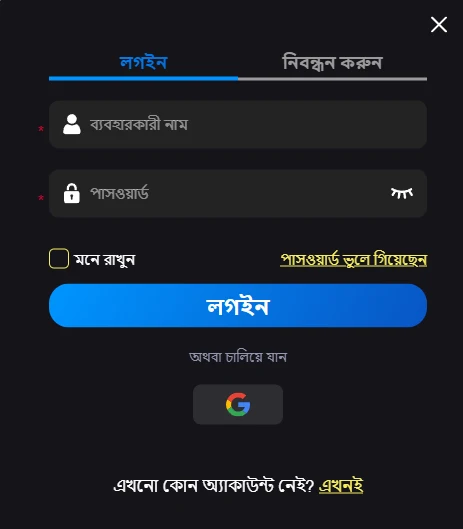
Practical tips to keep your BDBET login safe and smooth daily
Protect your account on the move with simple habits that block scams and speed up access.
- Use a strong, unique password and change it every few months.
- Keep two-factor authentication on for every sign-in attempt.
- Avoid public Wi‑Fi for sign-ins; use mobile data or a trusted network.
- Check the padlock icon and correct URL before entering credentials.
- Never share OTP codes or screenshots of your account with anyone.
- Ensure your account name matches your payment name to prevent holds.
Daily check-in rewards that add value to your cricket and slots play
Login daily to build streak rewards that convert into free bets, small cashback, or spins. Cricket fans can earn match-day boosts, while slot players may receive JILI spin rewards on selected titles.
Welcome and reload perks are easier to track once signed in, including any active BDBET bonus progress. For current offers and terms, open the promos page via BDBET Promotions after you sign in.
Common sign-in problems and simple fixes to access your BDBET account
I forgot my password and can’t sign in
Use Forgot Password to reset via email or SMS. Create a new, strong password and store it in a manager to avoid repeats.
I’m not receiving the OTP code
Check mobile signal and clear SMS filters. Request a new code after 60 seconds, or switch to email OTP if available.
My account shows locked or suspended
This may follow repeated failed attempts or verification gaps. Contact support, confirm your identity, and request reactivation.
I’m stuck in a sign-in loop on the website
Clear browser cache and cookies, then try again. If the issue persists, switch browsers or use the mobile app.
New device flagged for additional verification
Approve the device via OTP and mark it as trusted on your next sign-in. Avoid using shared or café devices for your account.
The app won’t open or crashes on start
Update to the latest app version and restart your phone. If you still face BDBET login problems, reach live chat for quick assistance.
FAQ about secure sign-in, apps, and account verification for BDBET
How do I sign in from my phone quickly?
Open the BDBET app or the official site in your browser, tap Sign In, enter your details, and complete OTP. Enable biometrics for faster future access.
Do I need two-factor every time I sign in?
Yes on new devices or risky sessions. On trusted devices with biometrics, you’ll usually approve once, then confirm only when security flags a change.
How do I confirm I’m on the official site?
Check the padlock icon, correct URL spelling, and security certificate details. Avoid links from random messages; type the address yourself.
Why must my account name match my payment name?
It protects your funds and speeds approvals. Name mismatches can trigger reviews, so keep your profile accurate and verified.
Will my bet slip be saved if I get disconnected?
Yes. Your active selections remain tied to your account. After reconnection, sign in and continue from where you left off.
Ready to sign in and play? Access BDBET on mobile in seconds
Sign in now to access your BDBET account, follow live cricket odds, and enjoy JILI slots with strong protection. Quick OTP checks and trusted devices keep you moving.
Stay verified, keep your details current, and come back daily for rewards. Your next winning bet starts with a secure sign-in.